
Electric Recliner Spare Parts, Recliner Button Switches
eMoMo HX90DKU Recliner Switch
$49.99
In stock
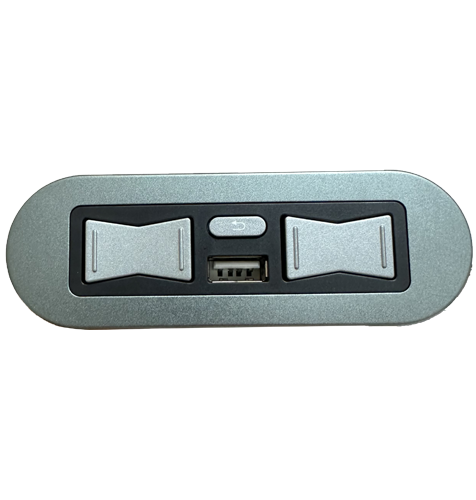
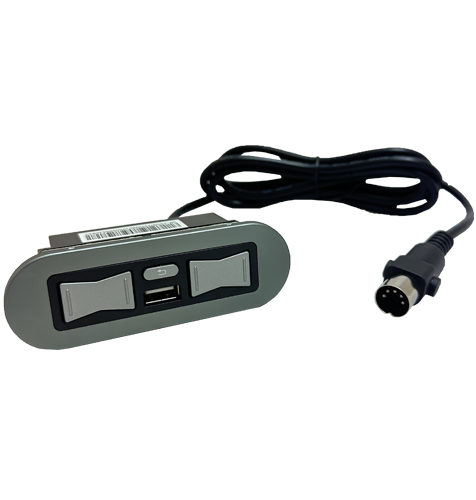
Genuine eMoMo Tech HX90DKU 4 button recliner switch with USB-A charging port, home/reset button and silver metal fascia. Designed for dual actuator electric recliners where the front buttons operate the footrest and the rear rocker switch operates the powered headrest. This switch has a straight DIN 5 pin plug with retaining prongs and is the right hand operated version when seated in the furniture. eMoMo HX90DKU Right Hand Recliner Switch with USB. This replacement switch suits compatible electric recliners using the HX90DKU model. Please check the barcode label on your existing switch before ordering to confirm the model number and correct hand orientation. Not the Switch Your Looking For? We stock all the popular recliner switches (click here). If you are still not sure which replacement power recliner chair or sofa switch is right for you please contact our helpful team. read more
In stock
- Description
- Technical Specifications
- How To Tutorial
- Reviews (0)
- FAQs
- Add a review
Description
eMoMo HX90DKU 4 Button Recliner Switch with USB-A Port
This genuine eMoMo Tech HX90DKU recliner switch is a replacement control switch for compatible dual actuator electric recliners. The front two buttons operate the footrest, the rear rocker switch operates the powered headrest, and the middle button is the home/reset button.
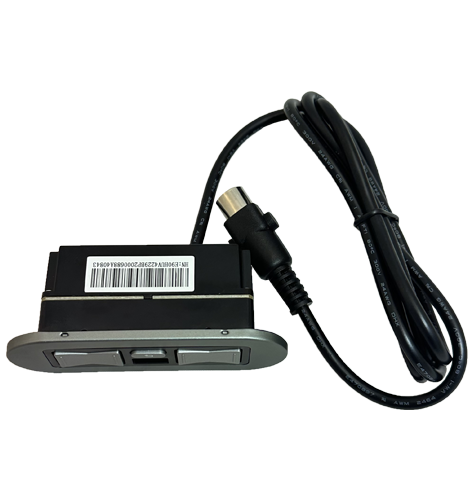
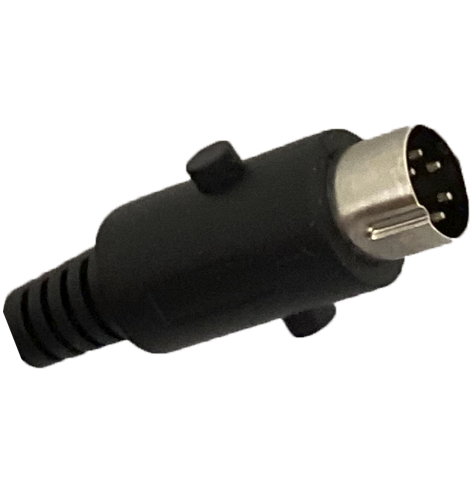
The HX90DKU has a silver metal fascia, plastic housing, USB-A charging port and a straight DIN 5 pin plug with retaining prongs. It is designed for electric recliners that use the matching eMoMo HX90DKU switch configuration and plug type.
Right Hand Operated Switch When Seated
This listing is for the HX90DKU version, which is the right hand operated switch when you are seated in the furniture. When looking at the recliner from the front, this is the left hand facing side of the furniture.
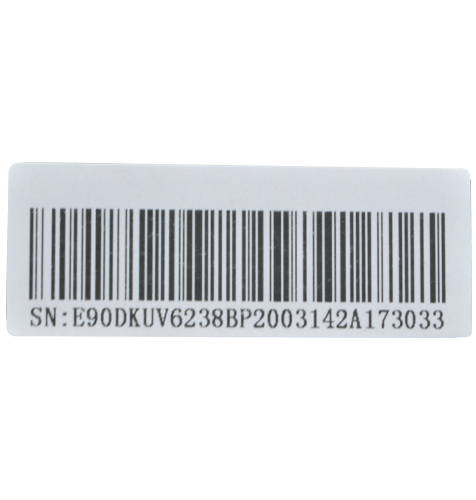
Please check the barcode label and model number on your existing switch before ordering. If your existing switch is marked HX90DKU, this is the correct version. If your existing switch is marked HX90DKUN, you will need the left hand operated version instead.
Need the Left Hand Operated HX90DKUN Version?
The matching left hand operated version is the eMoMo HX90DKUN recliner switch. This is also commonly referred to as the LHF version, meaning left hand facing when looking at the furniture from the front.
If your recliner uses the HX90DKUN model, please order the HX90DKUN recliner switch (click here) instead. Choosing the correct hand orientation is important because the switch shape, cable direction and button layout need to match your recliner.
We're Australia's Leading Supplier of Recliner Chair Spare Parts
As Australia’s leading supplier of recliner spare parts and leather repair products, Sofa Rehab helps make DIY repairs easier and more affordable. Enjoy great prices on quality replacement parts, helpful support from our team, and bulk buying options for trades customers who regularly purchase repair supplies.
Save Time & Money and Do It Yourself
Replacing a recliner switch is a practical DIY repair for many electric recliners. Once you have confirmed the correct replacement model, the switch connects using a push together DIN plug, so no electrical wiring experience is required.
With the right replacement part, you can restore the footrest, headrest, home button and USB charging function of your recliner without replacing the whole chair. Order the correct eMoMo switch, fit it yourself, save money and enjoy the satisfaction of getting your recliner working again.
Technical Specifications
Technical Specifications
| Make | eMoMo Tech |
|---|---|
| Model Number | HX90DKU |
| Alternative Model | HX90DKUN left hand operated version sold separately |
| Function | Front 2 buttons operate the footrest, rear 2 buttons operate the headrest, and middle button is the home/reset button |
| Location | Right hand operated when seated in the recliner |
| Colour | Silver |
| Material | Plastic housing with metal fascia |
| Plug | Straight DIN 5 pin plug with retaining prongs |
| External Fascia Dimensions | 103 mm wide x 34 mm deep |
| Thickness | 42 mm including housing and buttons |
| Cable Length | 1450 mm maximum |
| Power Rating | Input 29V 2A and Output 5V 2.1A |
How To Tutorial
How To Tutorial
How To Replace The eMoMo HX90DKU Recliner Switch
Replacing the eMoMo HX90DKU recliner switch is a practical DIY repair for many electric recliners, provided you have confirmed the correct model number, hand orientation and plug type before starting. This switch uses a straight DIN 5 pin plug with retaining prongs, so there is no electrical wiring required.
Important: Before removing your old switch, take a clear photo of the existing switch, cable route, barcode label and plug connection. This gives you a handy reference if you need to check the original position or ask us for help.
Before You Start
- Unplug the recliner from the wall power socket.
- Disconnect the recliner battery pack if one is fitted.
- Take a before photo of the existing switch, barcode label and cable connection.
- Check that your old switch is marked HX90DKU.
- Compare the plug on your old switch with the straight DIN 5 pin plug on the replacement switch.
- Make sure the recliner is positioned somewhere safe with enough room to access the side of the furniture.
Safe lifting reminder: Recliners and lounges can be heavy and awkward to move. Use safe lifting techniques, keep your back straight, bend your knees, avoid twisting while lifting, and ask another person to help if the furniture needs to be tilted or moved. Do not attempt to lift heavy furniture on your own.
Tools You May Need
- Phillips head screwdriver
- Flat blade screwdriver or trim tool, if needed to gently remove the switch fascia
- Torch or phone light to see the plug connection under the chair
Step 1: Confirm The Correct Switch
Check the barcode label on your existing switch and confirm the model number is HX90DKU. This listing is for the right hand operated version when seated in the recliner. When looking at the furniture from the front, this is the left hand facing side.
Step 2: Disconnect The Recliner From Power
Switch the recliner off at the wall and unplug the power supply from the wall socket. If your recliner has a battery backup pack, disconnect it as well. Never work on an electric recliner while it is still connected to power.
Step 3: Access The Existing Switch Cable
Carefully move or tilt the recliner only as much as needed to access the underside or side area where the switch cable connects. Use safe lifting techniques and get help from another person if the furniture is heavy or awkward.
Follow the cable from the existing switch to the plug connection. Take another photo before unplugging it, especially if there are multiple cables nearby.
Step 4: Unplug The Old Switch
Locate the straight DIN 5 pin plug connection from the old switch. Release the retaining prongs if fitted, then gently pull the plug apart by holding the plug body. Do not pull directly on the cable.
Step 5: Remove The Old Switch From The Furniture
Remove the old switch from the side of the recliner. Depending on your furniture design, the switch may be held in place by screws, clips or the switch fascia. Take care not to damage the upholstery or surrounding trim while removing it.
Step 6: Fit The New HX90DKU Switch
Place the new HX90DKU switch into the same position as the original switch. Make sure the button layout is facing the correct direction and the cable is routed safely through the same path as the original cable where possible.
Secure the switch in place using the original fixing method. Avoid overtightening screws into plastic housing or furniture trim.
Step 7: Connect The New Switch Plug
Push the straight DIN 5 pin plug from the new switch into the matching socket. Make sure the plug is aligned correctly before pushing it together. The retaining prongs should hold the plug securely once connected.
Check that the cable is not stretched, pinched, crushed or positioned near any moving parts of the recliner mechanism.
Step 8: Test The Recliner Functions
Reconnect the recliner to power. Test each function before fully moving the furniture back into position.
- Test the front buttons to open and close the footrest.
- Test the rear rocker switch to open and close the headrest.
- Test the middle home/reset button.
- Test the USB-A charging port with a suitable USB cable and device.
If any function does not work as expected, disconnect the recliner from power and recheck the plug connection, cable route and model number.
Need Help?
If you are unsure whether this is the correct replacement switch, or if your recliner does not operate correctly after installation, contact us for assistance. Please send photos of your old switch, barcode label, plug and the recliner connection area so we can help you identify the issue.
You Can Do It! With the correct replacement switch and a little care, you can restore your recliner controls yourself and save money on a service call.
Reviews (0)
Thank you for making an effort to leave a reivew but to protect against spam we only accept reviews from verified owners. Please proceed to login using the same email address you used when ordering the product.
Customer Login
- There are no reviews yet.
FAQs
FAQs
Is the HX90DKU the left hand or right hand recliner switch?
The HX90DKU is the right hand operated switch when you are seated in the recliner. When looking at the furniture from the front, it is fitted to the left hand facing side of the furniture. Always check the barcode label on your existing switch before ordering.
What is the difference between HX90DKU and HX90DKUN?
The HX90DKU and HX90DKUN are opposite hand versions of the same style of eMoMo recliner switch. The HX90DKU is right hand operated when seated, while the HX90DKUN is left hand operated when seated. Please order the model number shown on your existing switch label.
What do the buttons on this recliner switch operate?
The front 2 buttons operate the footrest, the rear 2 buttons operate the powered headrest, and the middle button is the home/reset button. This switch is made for compatible dual actuator electric recliners with separate footrest and headrest movement.
What plug does the HX90DKU switch use?
This eMoMo HX90DKU switch uses a straight DIN 5 pin plug with retaining prongs. Before ordering, compare your existing switch plug with the product photos and check that your old switch has the same model number.
Can I replace this recliner switch myself?
Yes, many customers can replace this switch themselves once they have confirmed the correct model and plug type. Disconnect the recliner from power first, take a before photo of the existing cable connection, then swap the switch using the same cable route and plug connection. If you are unsure, contact us with photos and we can help identify the right replacement.