
Electric Recliner Spare Parts, Recliner Button Switches
eMoMo HX90C2LUCN Recliner Switch
$64.99
In stock
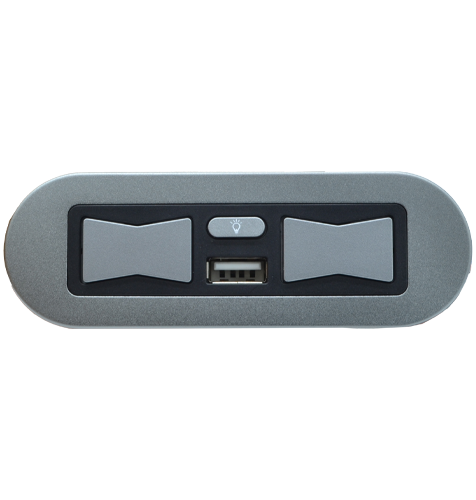
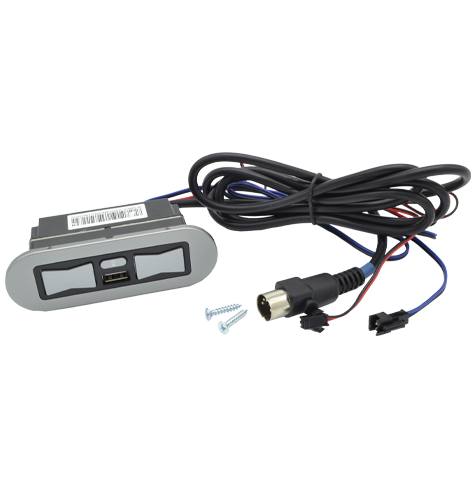
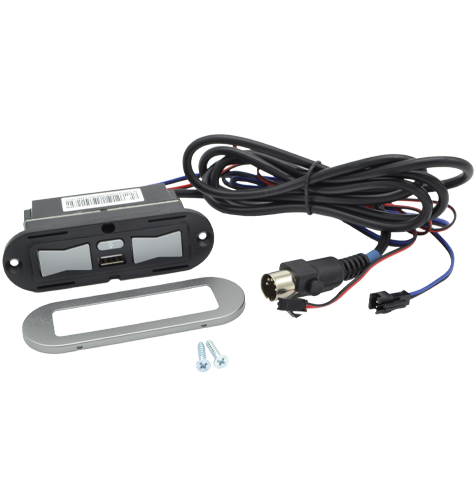
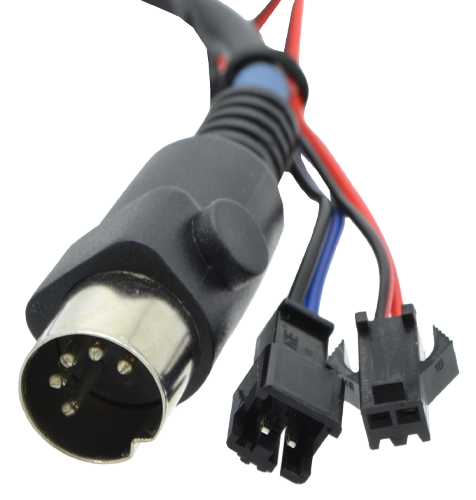
Replacement eMoMo Tech HX90C2LUCN 3 button electric recliner switch for the left hand side when seated in the recliner. This silver switch has two butterfly-style footrest control buttons, a smaller light on/off button and a built-in USB charging port. It includes a plastic housing, metal fascia, straight DIN 5 pin plug with retaining prongs, main cable, blue light cable and red light cable. eMoMo 3 Button Switch with Light and USB. The front butterfly button opens the recliner footrest, the rear butterfly button closes the footrest, and the smaller middle button turns the light on and off. Not the Switch Your Looking For? We stock all the popular recliner switches (click here). If you are still not sure which replacement power recliner chair or sofa switch is right for you please contact our helpful team. read more
In stock
- Description
- Technical Specifications
- How To Tutorial
- Reviews (0)
- FAQs
- Add a review
Description
eMoMo 3 Button Power Recliner Switch with USB and Light Control
The eMoMo Tech HX90C2LUCN is a replacement 3 button electric recliner switch for compatible power recliners, theatre lounges and electric seating furniture with lighting features. This silver switch has a plastic housing, metal fascia, built-in USB port and separate light control button.
The two large butterfly-style buttons operate the recliner footrest. The front butterfly button opens the footrest, the rear butterfly button closes the footrest, and the smaller middle button turns the light illumination on and off. It is a direct replacement style switch for recliners using the matching eMoMo model, barcode, plug and cable layout.
Left Hand Side When Seated in the Recliner
This listing is for the HX90C2LUCN switch, which is mounted on the left hand side when seated in the recliner. If your switch is mounted on the right hand side when seated, or your existing model code shows HX90C2CLU, you will need the opposite side version instead.
Please see our eMoMo HX90C2LUC recliner switch (click here) if you need the matching switch for the other side of your furniture.
Ordering the correct side is important because the button direction, fascia orientation and cable exit position may not suit the opposite arm or console location.
Match Your eMoMo Barcode Before Ordering
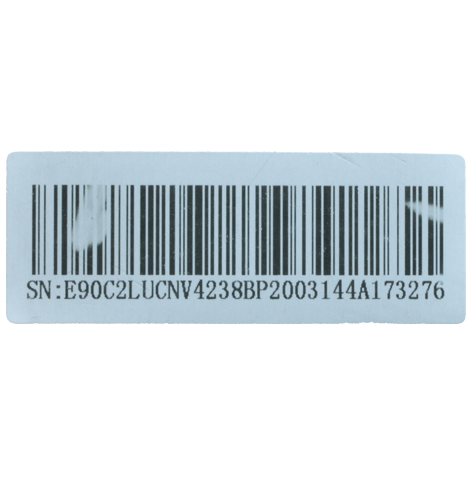
This switch is model HX90C2LUCN, but your original switch or barcode label may show a slightly different matching code. This is common with electric recliner spare parts, where the same switch can appear under more than one label or serial reference.
This listing is suitable when your existing switch shows HX90C2LUCN, HX90C2LUCN, E90C2LUCN or E90C2LUCNV. Barcode labels starting with SN:, E: or WT: can also refer to the same compatible switch when followed by the matching code.
If your existing switch shows HX90C2LUC, that is normally the opposite side switch and not this left hand side when seated model. Please check carefully before ordering so you receive the correct replacement for your recliner.
We're Australia's Leading Supplier of Recliner Chair Spare Parts
Sofa Rehab is Australia’s leading supplier of DIY furniture repair kits and recliner spare parts. We keep our prices low so you can repair it yourself and save money. If you’re a tradesperson or repair technician buying in bulk, ask us about our trades account discounts.
Save Time & Money and Do It Yourself
Replacing a matching electric recliner switch is usually a simple do-it-yourself repair. Once the recliner is disconnected from power, the old switch can normally be removed from the arm or console panel, unplugged from the wiring system, and replaced with the matching new switch.
No specialist experience is usually required when the correct replacement part has been selected. With the right switch, a little care and Sofa Rehab support if you need it, You Can Do It yourself, save time and money, and get your favourite recliner working again.
Replacing a matching electric recliner switch is usually a simple do-it-yourself repair. Once the recliner is disconnected from power, the old switch can normally be removed from the arm or console panel, unplugged from the wiring system, and replaced with the matching new switch.
No specialist experience is usually required when the correct replacement part has been selected. With the right switch, a little care and Sofa Rehab support if you need it, You Can Do It yourself, save time and money, and get your favourite recliner working again.
Technical Specifications
Technical Specifications
| Make | eMoMo Tech |
| Model Number | HX90C2LUCN |
| Function | Front button opens the footrest, rear button closes the footrest, and middle button is the light illumination button. |
| Location | Left hand side when seated in the recliner. |
| Colour | Silver |
| Material | Plastic housing and metal fascia |
| Plug | Straight DIN 5 pin plug with retaining prongs |
| Dimensions | External fascia is width 103mm, depth 34mm. Thickness including housing and buttons is 42mm. |
| Main Cable | Length is 1450mm maximum |
| Blue Light Cable | Length is 800mm |
| Red Light Cable | Length is 790mm |
How To Tutorial
How To Tutorial
- Disconnect the recliner from power.
Unplug the recliner from the wall socket before starting any work. If your furniture uses a battery pack, disconnect the battery pack as well. - Take a before photo for reference.
Before unplugging anything, take clear photos of the existing switch, cable routing and plug connections. This gives you a handy reference when fitting the new switch. - Access the switch safely.
Carefully move the recliner so you can reach the switch wiring. Practice safe lifting techniques, avoid twisting your back, and ask another person to help if the furniture is heavy or awkward to move. - Remove the existing switch.
Unscrew or unclip the old switch from the arm, inside panel or console area. Keep the screws aside if they will be reused. - Disconnect the old switch cables.
Gently unplug the straight DIN 5 pin plug and the light cables from the recliner wiring. Do not pull directly on the wires. Hold the plug body where possible. - Compare the old and new switches.
Check that the model, plug type, cable layout, fascia size and mounting side match before installing the new HX90C2LUCN switch. - Connect the new switch.
Plug the new switch cables into the matching recliner connections, using your before photo as a guide. Make sure each plug is fully seated and secure. - Test before final fitting.
Reconnect power and briefly test the switch. The front butterfly button should open the footrest, the rear butterfly button should close the footrest, and the middle button should turn the light on and off. - Fit the switch into position.
Once tested, disconnect the power again, place the switch neatly into the arm or console opening, and secure it with the correct screws or fixing method. - Final safety check.
Reconnect the recliner to power and check the switch again. Make sure no cables are pinched, stretched or caught in the reclining mechanism.
If the switch does not operate as expected, disconnect the recliner from power and check the plug connections against your before photo. If you are unsure, contact Sofa Rehab for help before continuing.
Reviews (0)
Thank you for making an effort to leave a reivew but to protect against spam we only accept reviews from verified owners. Please proceed to login using the same email address you used when ordering the product.
Customer Login
- There are no reviews yet.
FAQs
FAQs
Will this HX90C2LUCN switch fit my recliner?
This switch fits the left hand side when seated in the recliner. At Sofa Rehab, left and right always means the side when you are sitting in the furniture. If you are standing in front of the recliner looking at it, this switch would be on the right hand facing side.
What do the buttons on this recliner switch do?
The front butterfly button opens the recliner footrest, the rear butterfly button closes the footrest, and the smaller middle button turns the light illumination on and off. This switch also has a built-in USB port for device charging where supported by your recliner.
What if my existing switch says HX90C2LUC?
If your existing switch is marked HX90C2LUC, you most likely need the opposite side switch, not this HX90C2LUCN model. Please check the model code carefully before ordering, or contact Sofa Rehab with photos of your switch and barcode if you are unsure.
My switch looks the same will it still work?
The model number must be the same as ours to work. Model HX90C2LUCN.
Can I install this recliner switch myself?
Yes, replacing a matching recliner switch is usually a simple do-it-yourself repair. Disconnect the recliner from power, take a before photo of the wiring for reference, remove the old switch, plug in the new matching switch and test it before final fitting. You Can Do It yourself and save money.